
Quick answer: What is YouTube Content ID?
YouTube Content ID is a matching system that compares uploaded videos with reference files supplied by rights holders. When it finds a match, the rights holder’s policy can monetize, track, or block the video, depending on the territory. A Content ID claim is different from a copyright strike. See YouTube’s explanation of Content ID.
Key takeaways
- Distribution to YouTube Music and enrollment in Content ID are separate services.
- Permission to release a song does not automatically make its audio eligible for Content ID.
- If your own song receives a claim, identify the claimant and the rights being claimed before disputing it.
- Before changing providers, coordinate Content ID ownership and existing claims to avoid overlapping administration.
How YouTube Content ID actually works
A reference file supplies the audio or video used for matching. An asset holds information about the work, ownership, and policies. A claim connects a matching video to an asset. These are different parts of the same rights-management process.
The administrator supplies an eligible reference and specifies where it controls rights. YouTube compares uploads against reference material and applies the relevant policy when a match is found. Matching is not a guarantee that every use will be identified or earn revenue. How matching and policies work.
YouTube Music distribution vs. Content ID
| Service | What it does |
|---|---|
| YouTube Music delivery | Makes the delivered release available through YouTube’s music catalog, including Art Tracks where applicable. |
| Content ID administration | Uses eligible references to identify matching uploads and apply rights-holder policies. |
| Channel monetization | Concerns revenue earned through the creator’s channel and applicable YouTube Partner Program terms. It is not Content ID enrollment. |
An Art Track being live does not prove that Content ID matching is active. YouTube’s delivery documentation says Art Track delivery can create an inactive sound-recording reference; activation for Content ID uses a separate delivery route. Ask your provider to confirm both services independently. YouTube’s Art Track and reference-file documentation.
Is my music eligible for YouTube Content ID?
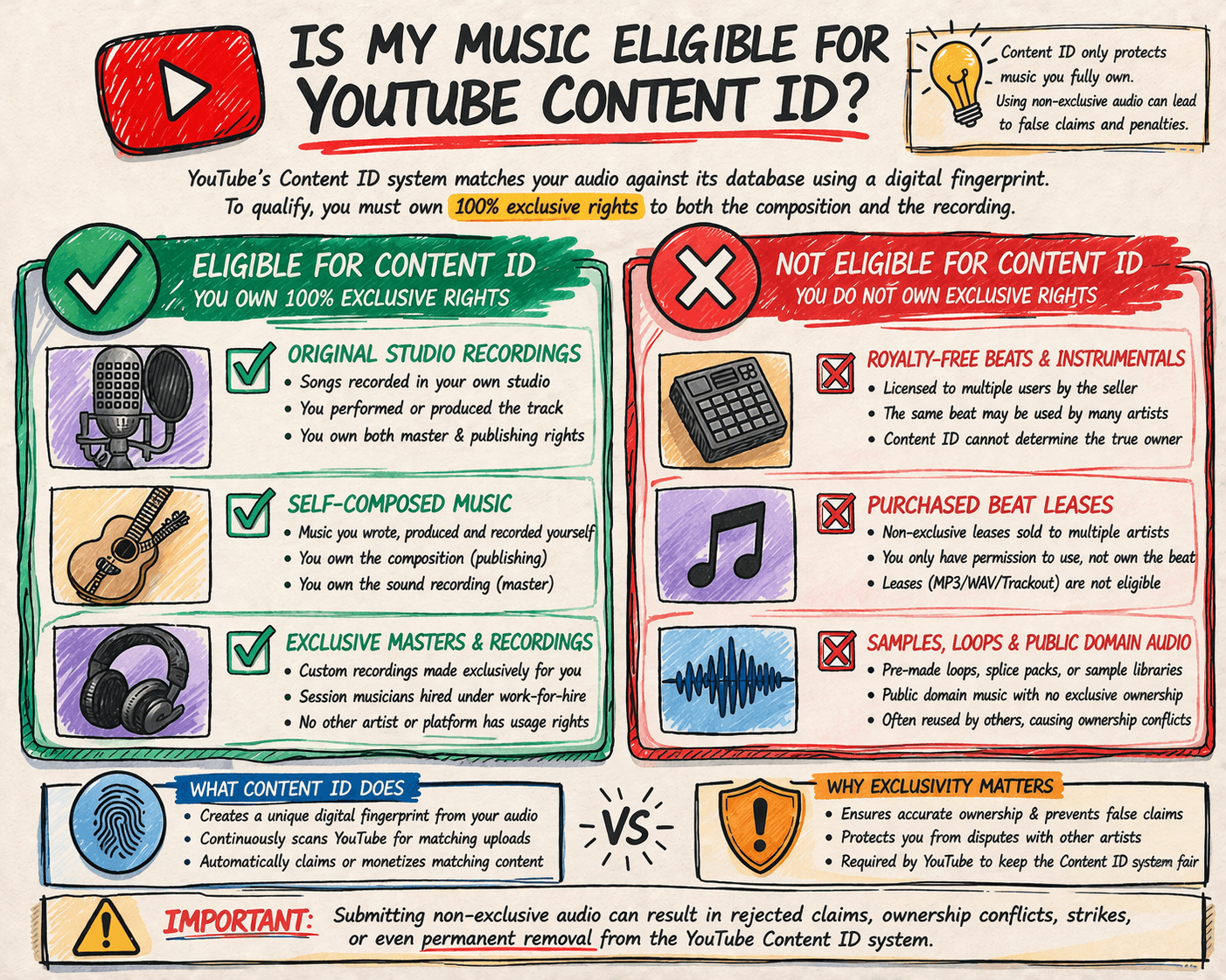
You must control exclusive rights to the reference material in the territories you claim. A license to distribute audio is not necessarily permission to claim other people’s uploads. YouTube excludes nonexclusive third-party material and requires sufficiently distinctive references. Read the Content ID reference requirements.
| Your recording includes… | What to check before enrollment |
|---|---|
| An original recording you control | Document your exclusive rights and the territories covered. Provider review still applies. |
| A leased or nonexclusive beat | Do not enroll on the strength of a standard nonexclusive license. Ask what rights the agreement actually grants. |
| Shared loops or stock audio | Check for nonexclusive or nondistinctive material that makes automated claims inappropriate. |
| A cover song | Separate rights in your recording from rights in the underlying song; ask the administrator to review both. |
| AI-generated elements | Review tool terms, exclusivity, underlying material, and the provider’s current policy. Do not assume acceptance. |
The exclusivity requirement
Keep a rights file with signed agreements, contributor permissions, licenses, recording identifiers, and territorial limits. YouTube may ask for evidence of exclusive ownership when assessing access. A later “exclusive” beat purchase is not a substitute for checking earlier licenses and retained rights. YouTube’s qualification criteria.
The master recording and the composition are separate rights. An ISRC identifies a recording; an ISWC identifies a musical work. Neither identifier proves ownership. For the related income streams, see our mechanical and performance royalties guide.
AI music and generative audio
There is no useful blanket answer based only on the label “AI music.” Confirm what was generated, which rights you hold, whether others can receive the same material, and whether your provider accepts that recording. Do not describe all AI output as public domain or assume that paid access to a tool creates exclusive rights. If the evidence is unclear, request a review before enrollment.
What happens if you get a claim? Claim vs. strike
| Question | Content ID claim | Copyright strike |
|---|---|---|
| What triggers it? | A Content ID match and the associated rights policy. | A valid copyright removal request. |
| What happens to the video? | It may be monetized, tracked, or blocked. | It is removed following the valid request. |
| Does it affect the channel? | Usually affects the video, rather than the channel. | Affects the channel’s copyright standing. |
| What should you do? | Inspect the claimed segment, claimant, and restrictions. | Review the removal notice and YouTube’s available resolution options. |
A claim is not automatically harmless, and it does not automatically create a strike. A disputed claim can lead to a removal request. Three active copyright strikes can put a channel at risk of termination. Sources: Content ID claims and copyright strikes.
Why did my own song receive a Content ID claim?
Your distributor or rights administrator may be claiming the recording on your behalf. A separate publisher may be claiming the composition. Another possibility is an old administrator, conflicting ownership information, or an incorrect match. The fact that you uploaded the video does not identify which explanation applies.
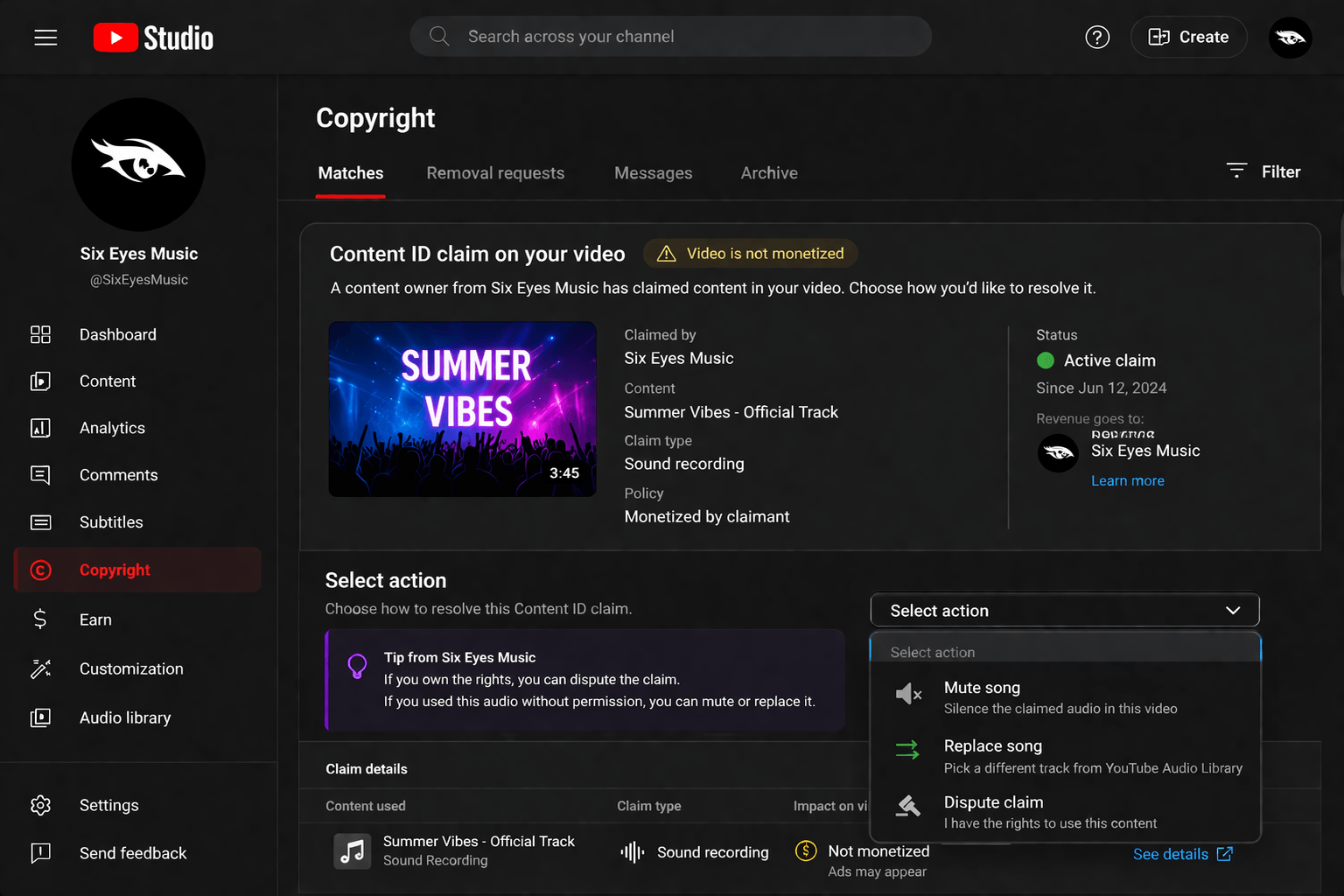
- Open YouTube Studio and check the video’s copyright restriction details. Record the claimant, matched segment, policy, and affected territories.
- Compare those details with your recording and publishing agreements. Check whether the named company administers rights for one of your partners.
- Send your administrator the video URL, claim details, track title, ISRC, and relevant rights evidence. Ask whether the claim is expected and where revenue is reported.
- If your channel should be excluded, ask the administrator about allowlisting and whether the existing claim also needs a separate release.
YouTube’s allowlist rules distinguish future claims from existing ones: adding a channel does not automatically release claims already made. If several partners own an asset, each may need to allowlist the channel.
What can I do if I get a Content ID claim?
First decide whether the claim is valid. If it is, YouTube may offer tools to trim, replace, or erase the claimed audio. You can leave a valid claim in place if you accept its effects, but this does not grant you new usage rights. Review the claim and available actions in YouTube Studio.
The dispute process
Dispute a claim only when you have a valid basis, such as the necessary rights, a mistaken match, or an applicable copyright exception. Giving credit, owning a purchased copy, or turning off monetization does not establish that basis. YouTube’s dispute guidance.
Explain the specific error and provide relevant evidence. The claimant has up to 30 days to respond to an initial dispute. It can release the claim, reinstate it, or submit a removal request; the claim can also expire if there is no response. YouTube does not resolve ownership disagreements for you. Review the consequences before escalating to an appeal.
When both parties want to monetize, YouTube can hold revenue during the dispute and pay the appropriate party after resolution. Disputing within five days of the claim affects whether revenue is held from the claim date; later disputes start the holding period from the dispute date. How revenue is handled during disputes.
How to keep your Content ID setup accurate
- Submit only recordings you can support with rights documentation.
- Keep ownership territories, contributors, track metadata, and agreements consistent.
- Tell your administrator about licensed channels and uses that should not receive claims.
- Review unexpected claims and conflicts rather than assuming every automated match is correct.
How to get your music into YouTube Content ID
You can work with a distributor or rights-management provider that offers Content ID, subject to its acceptance rules. Direct access is also assessed by YouTube: it considers exclusive rights and a demonstrated need, including original material frequently uploaded by other users. A small artist is not automatically disqualified, but access is not guaranteed. Check YouTube’s eligibility criteria.
Questions to ask your provider
- Is Content ID included, optional, or separately reviewed for this release?
- Which recordings and licenses are excluded?
- What fees or revenue share apply, and how are deductions and payments reported?
- Who handles incorrect claims, disputes, and channel allowlisting?
- How are references, ownership, and claims handled if I leave?
For Six Eyes, review our music distribution features and current plans, then ask our team to confirm Content ID eligibility and terms for your catalog. Confirm acceptance, fees, and support arrangements before enrolling. Our royalties page provides additional payout information.
Switching providers: a Content ID handover checklist
Treat Content ID administration as a separate handover item when moving distribution. The following checklist is an editorial workflow for coordinating that handover, not a universal transfer process or a promise of uninterrupted revenue.
- List each recording, ISRC, current administrator, claimed territories, and known active claims.
- Ask the outgoing provider how and when it will release ownership or deactivate references, and what happens to existing claims.
- Ask the incoming provider what evidence it needs and when it will begin administration.
- Coordinate the dates in writing so the two providers do not assert overlapping exclusive rights for the same territories.
- After the handover, check sample claims, ownership conflicts, and reporting with both providers.
YouTube treats incompatible ownership assertions as an ownership conflict; monetization is typically postponed until the conflict is resolved. Do not assume that taking down an Art Track automatically completes the Content ID handover. How YouTube handles asset ownership conflicts.
Frequently asked questions
Is YouTube Content ID free?
Provider charges vary. Check setup fees, recurring fees, revenue share, and exit terms. Do not assume that a distribution plan includes Content ID or that a quoted percentage covers every deduction.
How long does Content ID activation take?
There is no single activation timeline that applies to every provider and recording. Rights review, delivery, and reference processing are separate steps. Ask for confirmation that the reference is active rather than relying only on your release appearing on YouTube Music.
Can I register a song made with a leased beat?
A nonexclusive beat license is not enough to establish exclusive reference rights. Check the actual agreement and obtain a provider review. Permission to distribute or monetize your own release does not necessarily permit claims against other licensees.
Does Content ID apply to YouTube Shorts?
Shorts have specific rules. A Short longer than one minute with an active Content ID claim is blocked, regardless of the claim policy. Music availability in the Shorts library also depends on partner delivery, rights, and agreement requirements. Do not equate a creator’s Shorts earnings with the artist’s recording royalties. Sources: claims on Shorts and music eligibility for Shorts.
Will deleting a video remove a copyright strike?
Deleting a video generally does not resolve a strike that has already been issued. Follow the options in the removal notice. Scheduled removal requests can have a different process before a strike is applied. Read YouTube’s copyright strike guidance.